Showing posts with label buildings. Show all posts

Tuesday, 27 October 2009

Farm Assets : Barn and Tractor

Another themed area I wanted to include was a farm area (hence the tractor). Here is the tractor shown in the editor this time, along with a new asset for a barn. I think I'll need a windmill asset soonish, animating nicely in the wind.

Friday, 16 October 2009

Paris Skyline

Here we have a few shots of Paris. I played with the scale of the buildings and landmarks until I got the skyline I wanted. There are only a few unique assets used here, but used over and over a lot. Once again simple but effective. Hopefully I've captured the Parisian style.

Tuesday, 24 March 2009

Eastern District

Here are a few screenshots to give a flavour of the Eastern District. The only new assets here are the overhead banners stretching from building to building. These simple assets are double sided and mapped so they can be viewed correctly from both the front and back.

And at dusk...

And here is a similar shot showing the monorail cutting through the centre of the cityscape.

Monday, 23 March 2009

Tower Blocks

I've also been busy building a few er...buildings. Tower blocks more precisely for the Eastern District in my route. Once again these are very simple assets, low polygon count and low texture resolution. These will be used in the centre of town, where neon signs and billboards will be the dominant features.

For the banners and fake logos, I've used a cool free font (called Massive 10 K) by Keisuke Asami. It seems to perfectly suit the style I was after. So thanks Keisuke Asami for the work on the font.

Distant Buildings

As I don't intend on building a vast huge sprawling route (this route will be small and detailed), I needed a cheap asset that I could place in the distance and give the illusion of distant objects. This seems to work well. I opted for a scenery object rather than a loft because I wanted night nodes that would illuminate the windows at night.

Here is the single asset. It's a single polygon and uses a texture with transparency.

Thursday, 5 March 2009

Seasonal variations

Just a quick test to see how things look at night-time and during winter. Below are three screenshots showing the same scene at different times of day, during summer and winter seasons. The path and snow-mounds are part of the house model, so it makes for easy placement in the route.


Tuesday, 24 February 2009

Night-time update

Just a quick update to show how the experiments with 'night-time effects' are going. This effect uses a simple additive material applied to the night node of the house. The night node gets switched on or off depending on whay time of day it is.

I particularly like the effectiveness of the wall light on the side of the house. Once again. it's a simple effect, with the additive floor glow sliced in half and placed part on the floor, and part on the wall.

Wednesday, 21 January 2009

Winter screenshots

Here are two screenshots showing the seasonal texture variants. Notice how the mounds of snow appear on the roof during the winter season.

How to...Use Seasonal Textures

Rail Simulator supports seasonal textures, and it's a fairly straight forward idea to swap one texture for another depending on the season.

For example a brick wall might have two textures;

"brick_wall_01.ace" - the default texture
"brick_wall_01_wi.ace" - the winter version

In this example, the wall should be mapped using "brick_wall_01.ace". If any seasonal variants are required, the seasonal textures should be created in the same folder. Please see the DEV area of the Rail Simulator website for more detailed information.

Then once your wall asset is exported, the default textures AND your seasonal texture variants will be compiled. NOTE: If any additional textures are added, then the IGS for the asset must be re-exported to pick up these new textures.

In my previous post showing a concept image for a winter house, I wanted to change the outline colour depending on season. In this case, simple seasonal texture swapping was used.

See below. The black texture on the left is called "outline.ace", and the white texture on the right is called "outline_wi.ace". In any season other than winter, the outline is black. In winter, the outline is white.

However, we can also do something cool if we consider a material with TRANSPARENCY.

In the following example, the house has a mound of snow on the roof. The texture for the snow mound has two seasonal variants:

"winter_snow_mound.ace" - default texture
"winter_snow_mound_wi.ace" - winter version

Here's the clever bit.

The material for the snow is a simple 'TexDiff' shader but with the transparency flag in the shader set to TRANS.

The default texture is created so that it is fully transparent (fully black). And as it is used on a TRANS shader, it will appear invisible in the game. In any other season other than winter, it will look like this.
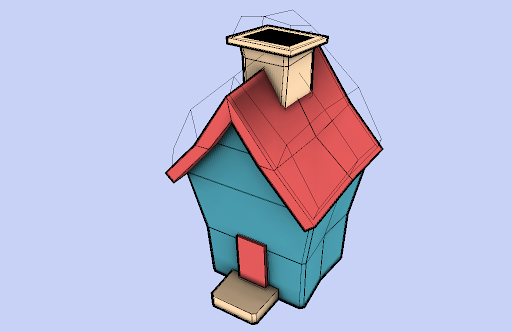
The winter version of the snow mound texture is an opaque white snowy texture (not transparent). This WILL appear in the game.
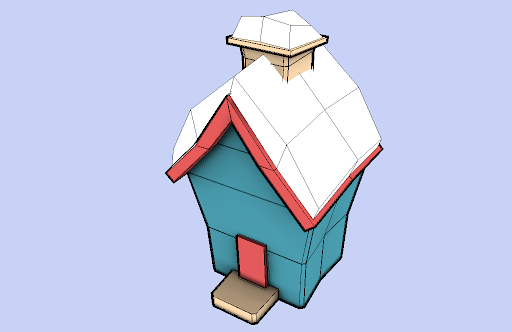
So we now have a method of making geometry appear and disappear depending on the season.

How about
- Hay bails only appearing in the summer
- Snowmen only appearing in the winter

You get the idea.

Tuesday, 20 January 2009

Winter house

Here is the first render showing how the buildings will look in this art-style. I've also just been playing with an idea on how to improve the look of the game during winter.

Rail Simulator supports texture swapping for the 4 seasons, and there's no reason why with some clever texture naming we couldn't re-create the following example.

The house on the left (Summer variant) has the black outline with no snow build-up. The house on the right (Winter variant) now has a white outline (black outlines wouldn't look good in the winter), with a 3D build-up of snow on the roof.